
What if a payroll error starts before anyone opens the payroll file? To reduce payroll errors in Kenya, employers need to control the information flowing into each pay run, not just recheck totals at the end. Outdated employee details, mismatched attendance and leave records, or unrecorded salary changes can all lead to corrections after payday.
Many of these problems are preventable with a repeatable process. A reliable payroll control checklist helps you validate employee records, reconcile work hours and leave, review salary changes, and check applicable deductions against current official guidance before finalising payroll. It also records who reviewed each change and how discrepancies were resolved.
This article covers practical review gates for every stage, from preparing accurate inputs to approving payroll and handling employee queries. Connected time and attendance, leave, payroll, and employee self-service tools can reduce repeated manual data entry. Zuri HR brings these workflows together, while your team remains responsible for reviewing and approving each pay run.
Key Takeaways
- Trace mismatches to their source, including employee records, approved pay changes, attendance, leave, and deductions.
- To reduce payroll errors in Kenya, combine consistent system checks with accountable manager approvals and payroll review.
- Use a pre-payroll sequence that assigns an owner, supporting evidence, and an exception check to every review step.
- Keep a traceable record of approvals, resolved discrepancies, and final payroll decisions.
- Connected payroll, time and attendance, and leave workflows can reduce repeated data entry while preserving human oversight.
Reduce payroll errors in Kenya by identifying where they begin
A payroll error is a preventable mismatch in employee data, time worked, pay, deductions, approvals, or records. It can start with one incorrect entry and travel through the payroll cycle: employee and pay details feed calculations, calculations determine salary amounts, and those amounts appear on payslips and payroll records. A single input problem can affect several outputs before anyone spots it.
Payroll accuracy means keeping data consistent, complete, and reviewable from the original input through approval and final records. That principle supports reliable payroll management principles, where accurate inputs and clear records underpin each pay run. To reduce payroll errors in Kenya, identify the handoffs where information can become inconsistent instead of treating every correction as an isolated mistake.
Which payroll errors occur most often in Kenyan businesses?
Errors often involve information that changes or moves between people and systems. A salary adjustment may be approved but not entered before payroll closes. Work hours may be typed incorrectly, or recorded leave may not match the payroll input. Other discrepancies can involve employee details, deduction inputs, approvals, or incomplete records.
- Employee details: A change to an employee’s bank or personal information may not reach the payroll record in time.
- Attendance and leave: Work hours or approved leave may be recorded differently in time records and payroll inputs.
- Pay inputs: A salary change, allowance, or other approved adjustment may be omitted or entered incorrectly.
- Deductions: An incorrect or outdated input can affect a calculation. Verify applicable requirements against current official guidance.
- Approvals and records: Missing approval evidence or an incomplete change history can make a figure difficult to substantiate later.
A one-off data-entry slip has a specific cause and can usually be corrected at its source. A recurring mismatch points to a workflow weakness, such as repeated manual transfers or unclear ownership of updates. Track whether the same type of error returns across pay cycles. That pattern helps distinguish a one-time correction from a control that needs redesign.
Why do small payroll discrepancies become harder to correct?
A discrepancy is easier to resolve when the reviewer can trace a figure back to its source. If attendance is in one file, leave approvals in another, and salary changes in email, the reviewer must reconstruct what happened. Without a clear source record, it becomes harder to establish which input changed, who approved it, or whether the payroll figure reflects the latest information.
Missing approvals and change histories also make later reviews harder. A difference in a payslip or payroll record does not automatically signal non-compliance. It may result from a timing issue, an input mistake, or another explainable cause. Investigate the mismatch, confirm the source information, correct the relevant record, and document the decision. This creates a traceable account and helps the team spot recurring process gaps before the next payroll cycle.
Trace payroll errors to employee data, attendance, and deductions
Start with the source, not the final payslip. Trace each payroll figure back to the record that produced it: employee details, authorised pay changes, attendance, approved leave, and deduction inputs. This helps you find where information changed or became inconsistent, rather than correcting a downstream number without fixing its cause.
Accurate calculations still depend on accurate, authorised inputs. Separate four error types during review: data-entry mistakes, policy interpretation issues, calculation faults, and approval failures. Each requires a different response. Correct a typing error at its source, clarify an interpretation with the responsible decision-maker, verify a calculation, or obtain the missing approval before treating a change as final.
How can employee and pay changes introduce errors?
Check employee names, identification or payroll references, bank details, employment status, and effective dates against authorised records. A correct change entered for the wrong effective month can still produce an inaccurate pay result. For salary, allowance, benefit, or deduction changes, keep a documented approval trail and compare the payroll entry with its authorised source document.
Use a controlled review rather than circulating full employee files. Give each reviewer access only to the details needed for their task, and record who verified a change and when. This protects sensitive information while preserving a usable history. If a payroll record differs from its source, pause the change, confirm the approved details, and document the resolution before proceeding.
How do attendance, leave, and Kenyan deductions affect payroll?
Reconcile attendance and approved leave to the relevant payroll period before processing. Check date ranges, missing clock-ins, corrections, and leave approvals against the records used to calculate pay. For example, a leave approval entered after the period closes may not appear in the payroll input unless someone checks the timing and updates the relevant record.
Next, verify that each applicable deduction is assigned to the correct employee and calculated using current rules. Employee and earnings information can affect statutory calculations, so an accurate formula cannot compensate for an incorrect employee status or incomplete earnings record. Check current guidance from the Kenya Revenue Authority (KRA), National Social Security Fund (NSSF), Social Health Authority (SHA), and the relevant Affordable Housing Levy authorities before configuring or reviewing obligations. Don’t rely on a copied rate or an old payroll file as proof that a rule remains current.
Keep the discrepancy, source record, decision, approver, and correction together. A mismatch may reflect timing or an input issue, not necessarily non-compliance, so investigate before drawing conclusions. This traceability helps teams reduce payroll errors in Kenya and identify recurring gaps in how information moves between HR, managers, and payroll.
Connected payroll, attendance, and leave records can reduce repeated manual transfers while keeping review responsibility with your team. Zuri HR payroll and workforce records bring these workflows into one platform to support more organised payroll operations.
Payroll automation helps, but review controls still prevent errors
Payroll software can standardise calculations and apply configured checks consistently. It can’t determine whether an unapproved salary change is legitimate, whether a manager entered the right hours, or whether a record reflects the latest authorised decision. Automation strengthens the process, but it doesn’t replace the people responsible for its inputs and approvals.
Use layered controls so each check has a clear owner and purpose. Where practical, separate the person who enters a change from the person who approves it and the reviewer who finalises payroll. In a small team, a second-person review of sensitive changes can still provide an independent check.
| Control | Primary role | What it checks |
|---|---|---|
| System validation | Payroll system | Flags missing required fields, configured rule exceptions, or mismatches between connected records. |
| Manager approval | Relevant manager | Confirms that pay or time changes are authorised and match the supporting decision. |
| Payroll review | Payroll reviewer | Checks exceptions, approved changes, deduction summaries, and unusual movements before finalisation. |
| Post-run reconciliation | Payroll or finance reviewer | Compares final payroll outputs with approved records and follows up on unresolved differences. |
What should automated payroll checks flag?
Configure checks to surface missing fields, unusual changes, incomplete approvals, and mismatches between connected records. For example, a system may flag a pay input that differs from the employee’s recorded salary or attendance that does not align with the payroll period. These alerts direct attention, but they don’t establish which record is correct or why it differs.
Connected time, attendance, leave, and payroll records can reduce repeated manual transfers between files and systems. That reduces opportunities for transcription mistakes, but source records still need clear ownership and review. Send each flag to an exception queue or review log, assign a named person to investigate it, and record the outcome.
Where should a human reviewer remain accountable?
Before finalising payroll, a reviewer should assess flagged items, confirm that changes have approval evidence, examine deduction summaries, and investigate unusual movements from the previous pay cycle. Record whether each exception was corrected, approved as valid, or held for further investigation. This decision trail supports consistent follow-up and makes the review repeatable.
Automation calculates, accountable reviewers approve the payroll outcome. This distinction keeps responsibility clear even when a system applies calculations automatically. To reduce payroll errors in Kenya, assign named owners to exceptions and require a separate approval or review before finalisation wherever practical. A dependable system can organise calculations and records, but your control process determines whether the inputs and decisions are ready for payroll.
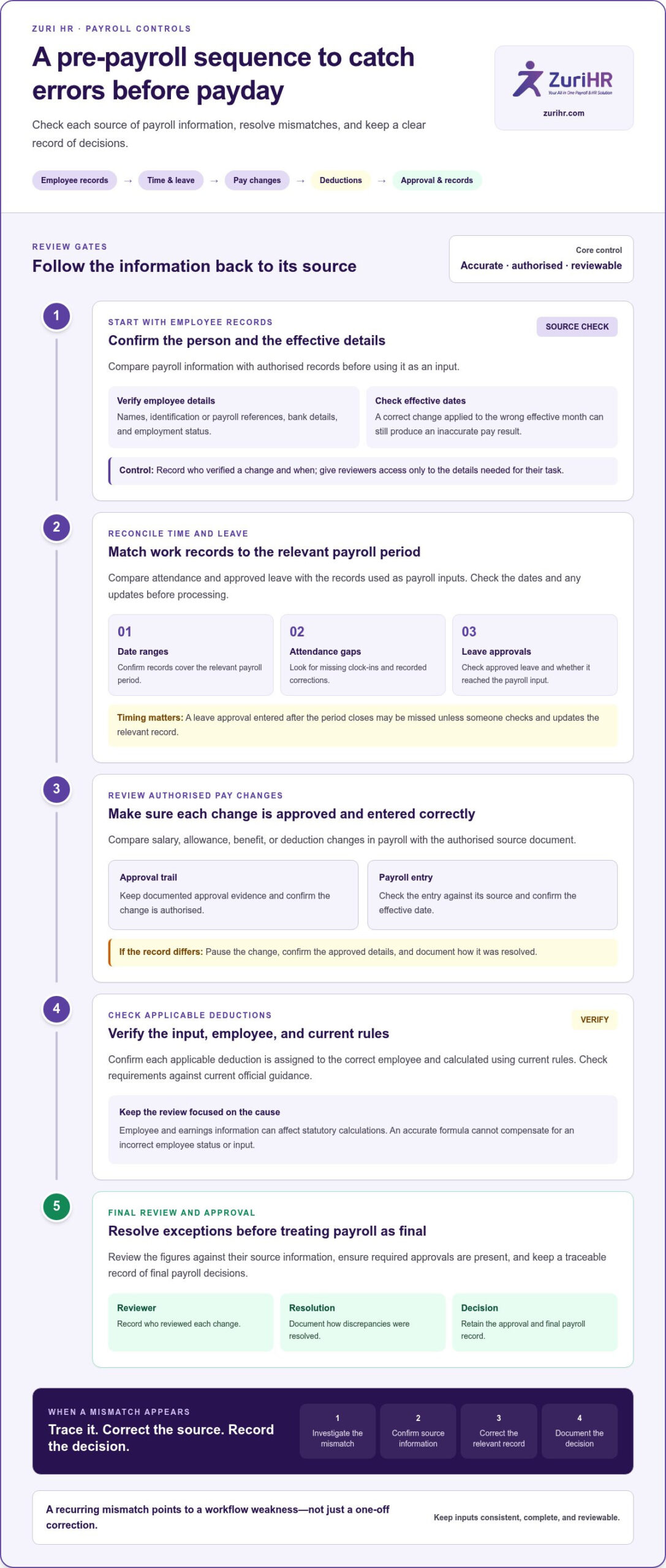
Use this pre-payroll checklist to catch errors before payday
Run the same sequence every pay cycle, with a named owner for each check. If a step reveals an unresolved exception, hold the affected item for investigation rather than carrying an unexplained difference into the final payroll. This workflow helps teams reduce payroll errors in Kenya through clear ownership, consistent evidence, and traceable decisions.
- Close payroll inputs. The payroll coordinator confirms the cut-off and gathers employee updates, approved pay changes, attendance, leave, and deduction inputs for the period. Compare the input register with source records. Resolve late submissions, missing records, or items that fall outside the period before continuing.
- Validate employee and pay changes. HR or the authorised data owner checks changed employee details, employment status, pay items, and effective dates against approved documents. Confirm the approver and retain the decision evidence. Return changes with missing approval or unclear effective dates for clarification.
- Reconcile time and leave. Managers confirm that attendance records and approved leave cover the correct payroll period. The payroll coordinator compares those records with payroll inputs. Investigate missing hours, duplicate entries, unapproved adjustments, or leave that appears in one record but not the other.
- Review calculations and deductions. The payroll reviewer checks calculation outputs, deduction summaries, and unusual pay movements against authorised inputs and current official guidance. Resolve incorrect employee mappings, unexplained variances, or outdated calculation settings before approval.
- Approve the payroll. Wherever practical, an authorised approver who did not prepare the full payroll reviews the exception log and supporting evidence. Record the approval and date. Keep unresolved or unsupported items out of the approved run until the responsible owner documents a decision.
- Archive the final record. The payroll coordinator stores the approved output, supporting changes, review evidence, and correction notes securely. Confirm that payslip totals reconcile with the approved payroll records, then log any remaining query for follow-up.
What to check before payroll is approved
Before sign-off, confirm that every employee change has an effective date and appropriate approval, and that attendance and leave align with the payroll period. Review deductions and unusual differences against authorised records and current guidance. The approver should be able to trace each significant figure to its source, rather than relying on a total alone.
What to record after payroll is processed
Keep the approved payroll output and its supporting evidence in a secure, organised location with access limited to appropriate staff. Log employee queries, the investigation, any correction, the source record, the approver, and the date. Periodically review recurring exceptions and update internal procedures when a pattern points to a weak handoff or unclear responsibility.
Build this checklist into a consistent payroll workflow with Zuri HR payroll management, and give your team a more organised way to manage payroll records and review steps.
Connect payroll, attendance, and leave with Zuri HR
A reliable checklist sets the control standard. Connected HR records can make that standard easier to apply by reducing repeated handling of employee information across attendance, leave, and payroll workflows. Zuri HR is a Kenya-built cloud HR and payroll platform that brings these functions together to support organised payroll operations without replacing your team’s review and approval responsibilities.
How connected HR records support payroll administration
Time and attendance tools capture work hours through biometric or mobile clock-ins, while leave management tracks balances, requests, and approval workflows. These records can inform payroll inputs, helping the payroll team work from relevant workforce information instead of re-entering the same details across disconnected files. The team still needs to check changes, exceptions, and approvals before finalising each run.
Zuri HR’s payroll module automates statutory tax calculations and salary processing, then distributes payslips. Employee self-service lets staff view their payslips and access personal records directly. This gives employees a way to retrieve their payroll information and identify a query using the relevant payslip, while payroll staff remain responsible for reviewing and resolving issues.
The value comes from a more connected flow of information, not from assuming that every record is automatically correct. A clock-in may need review, a leave request may still require approval, and an employee or pay change may need validation. Keep the same review gates in place, even when the underlying records sit within one platform. This balance helps reduce payroll errors in Kenya while maintaining accountable oversight.
How to move from manual checks to a repeatable process
Begin by documenting how your current payroll works. Map each input, who supplies it, who approves it, where the record is stored, and how the team corrects a discrepancy. Note recurring exceptions, such as late attendance adjustments or pay changes that reach payroll without clear approval. This baseline shows which handoffs create repeated work and where a connected process can support better record flow.
Next, define responsibilities and review points around your organisation’s payroll cycle. Specify who maintains employee details, who confirms attendance and leave, who reviews payroll calculations, and who approves the final output. Keep evidence of decisions and corrections accessible to appropriate reviewers, and verify statutory settings against current official guidance. Reassess the process when recurring exceptions reveal a gap, rather than relying on informal workarounds.
For a more connected way to organise payroll, attendance, leave, and employee records, explore Zuri HR’s integrated payroll and HR platform. Review your current workflow, identify one repeated manual handoff, and decide how your team will control it in the next pay cycle.
Make payroll control part of every pay cycle
Choose one practical improvement for the next payroll run: assign a clear owner to an unresolved input, formalise an approval handoff, or record how the team closes a correction. Apply that control consistently, then review whether it made the process easier to verify. Small, repeatable changes can strengthen payroll operations without adding unnecessary complexity.
To reduce payroll errors in Kenya over time, connect your review process to the way employee information moves through the organisation. Zuri HR is Kenya-built HR and payroll software with connected payroll, leave, time and attendance, and employee self-service modules. It supports a structured workflow while your team remains accountable for reviewing inputs and approving payroll.
Explore Zuri HR’s integrated payroll and HR platform to organise payroll, attendance, leave, and employee records in one connected workflow. Start by identifying one repeated manual handoff your team wants to control in the next pay cycle.
Frequently Asked Questions
How often should a business review its payroll process in Kenya?
Review payroll controls during every pay cycle, then assess the overall process periodically for recurring exceptions. A practical trigger for an additional review is a change in pay structure, staff responsibilities, or payroll settings. Track issues such as repeated late submissions or corrections to the same input type. This helps you decide whether to clarify ownership, revise a procedure, or adjust a system configuration rather than simply fixing each occurrence.
Can attendance software prevent payroll errors?
Attendance software can improve the quality and consistency of work-hour records, but it can’t prevent every payroll error. A missed clock-in, incorrect shift assignment, or unreviewed correction can still produce inaccurate data. Compare attendance exceptions with manager records before using them for pay calculations. Tools that capture work hours through biometric or mobile clock-ins can support this check, but a responsible reviewer still needs to resolve anomalies.
What should I do if I discover a payroll error after payday?
Confirm the affected employee, pay period, and source of the discrepancy, then calculate the correction and document how you reached it. Tell the employee what you found and explain the next step clearly. Update the payroll record and retain the original entry alongside the correction, approval, and communication. If the error affects a statutory calculation or remittance, check current official guidance from the relevant authority before making an adjustment.
Which records should a Kenyan employer keep to support payroll reviews?
Keep records that let a reviewer connect each payroll outcome to its source: employee details, approved pay changes, employment documents, attendance and leave records, payroll outputs, deduction calculations, and approval evidence. Add correction notes and relevant employee queries to the record for the affected period. Store sensitive information securely and limit access to staff who need it. Follow current official requirements for record retention and data handling.
Can payroll software calculate Kenyan statutory deductions automatically?
Yes. Payroll software can automate statutory tax calculations when its settings and employee information support the relevant calculation. Zuri HR’s payroll module automates statutory tax calculations tailored to Kenyan labour laws, alongside salary processing and payslip distribution. Payroll staff should still review employee and earnings details, investigate exceptions, and verify current requirements through official sources. Automation supports consistent calculation, but it doesn’t determine whether every input or approval is correct.
Why can payroll still contain errors after a business automates it?
Automation can process incorrect information consistently if someone enters outdated employee details, assigns the wrong pay item, or configures an unsuitable rule. Errors can also arise when approval steps happen outside the system and the payroll record doesn’t reflect the decision. Compare system outputs with authorised source documents and review exception patterns. This tests both the data and the workflow instead of assuming the software alone guarantees accuracy.
How can a business reduce errors when employee pay details change?
Use one controlled change request for each salary, allowance, benefit, or bank-detail update. Record the employee identifier, change, effective date, supporting document, and approver, then have a separate reviewer compare the approved request with the payroll record. For sensitive details, restrict access to the staff who process or verify the change. These controls help reduce payroll errors in Kenya by making updates easier to validate and trace.
Leave a Reply