The right payroll approach isn’t determined by headcount alone. It depends on how often your team repeats calculations and how reliably payroll inputs reach the person processing them. That’s the practical question behind payroll software vs manual payroll for a Kenyan business, where payroll must account for items such as PAYE, SHIF and NSSF. If staff are pulling figures from spreadsheets, attendance records and leave requests, manual processing can become harder to control even before the workforce grows.
It’s reasonable to ask whether software adds useful structure or simply introduces another system to manage. The answer depends on your workflow: where data enters, who reviews it, how calculations are checked and what happens when pay or employee records change. Software can centralise repeatable steps, but your team still needs clear controls and accurate inputs.
This comparison breaks down the workflows, control points and trade-offs of each approach, with practical criteria for assessing accuracy, staff effort and readiness to scale. It also looks at how connected attendance, leave and payroll records can reduce scattered handoffs. You’ll leave with a clear next step, whether that means tightening your manual process or evaluating software such as Zuri HR’s connected Payroll Management module.
Key Takeaways
- Compare payroll software vs manual payroll by tracing how employee data becomes approved pay records, not by using headcount as the only test.
- Manual processing can remain practical when records and pay calculations stay simple and stable. Review the workload as inputs and employee needs change.
- Map recurring calculations, leave changes, attendance inputs and employee record requests to identify where handoffs or repeated entry create friction.
- Set clear review points for calculations and records so your chosen workflow supports accountability as well as payroll preparation.
- Explore how connected Payroll Management can support gross-to-net calculations and SHIF, NSSF and PAYE automation alongside workforce records.
Payroll software vs manual payroll: What each approach involves
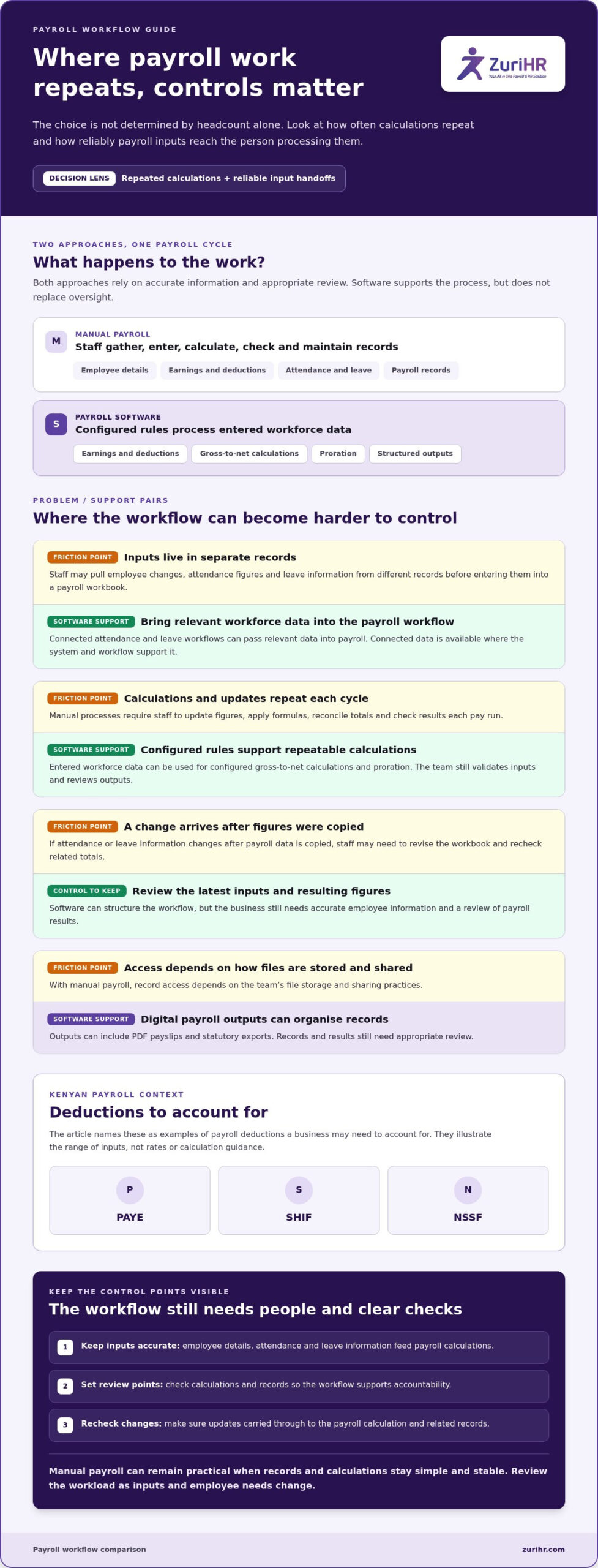
The practical difference is where the team manages calculations, inputs and records. Manual payroll relies on staff to calculate pay and maintain records in tools such as spreadsheets. Payroll software applies configured rules to entered workforce data and produces structured payroll outputs. Both approaches depend on accurate information and appropriate review. Software supports the process; it doesn’t replace oversight.
Payroll brings together employee pay and related records. For a foundational definition of payroll, consider how earnings, deductions and recordkeeping fit into the wider process. In a Kenyan business, the method you choose affects how your team handles employee details, attendance, leave and payroll calculations from cycle to cycle.
What does manual payroll require from a team?
Staff gather the information needed for each pay run, including employee details, earnings, deductions, attendance inputs and leave information. They enter or update those figures, calculate pay, check the results and maintain the records. If an employee’s attendance or leave information changes, someone must carry that update into the relevant calculation and payroll file.
A spreadsheet can organise data and formulas, but staff still manage how information moves between files and who updates each record. A payroll management system, by contrast, can be configured to process entered workforce data within one payroll workflow. The distinction is not whether a spreadsheet contains formulas. It is how the business structures, updates and reviews the work.
What does payroll software change?
Payroll software lets the business configure earnings, deductions and benefits, then use entered workforce data to support repeatable gross-to-net calculations. The team still needs to validate inputs and review outputs, but configured rules can be applied consistently instead of rebuilding calculations manually each cycle. Connected attendance and leave workflows can also pass relevant workforce data into payroll.
For example, Zuri HR’s Payroll Management module supports SHIF, NSSF and PAYE automation, gross-to-net calculations and proration. It also provides digital outputs, including PDF payslips and statutory exports. These capabilities organise payroll processing and records; the business still needs to check employee information and review payroll results. The payroll management software guide provides broader context on how payroll software supports this work.
| Area | Manual payroll | Payroll software |
|---|---|---|
| Workflow | Staff collect inputs, calculate pay and update records. | Configured rules process entered workforce data. |
| Data handling | Staff may transfer details between separate records or spreadsheets. | Payroll data is managed within a configured system, with connected workforce data where available. |
| Repeatability | Staff repeat calculations and updates each cycle. | Configured calculations support a consistent process, subject to review. |
| Record access | Access depends on how the team stores and shares files. | Digital payroll outputs can include payslips and statutory exports. |
This comparison frames payroll software vs manual payroll as a choice about workflow design and control. The right approach depends on how your team collects inputs, repeats calculations and maintains accessible records.
How the two payroll workflows handle data, calculations, and records
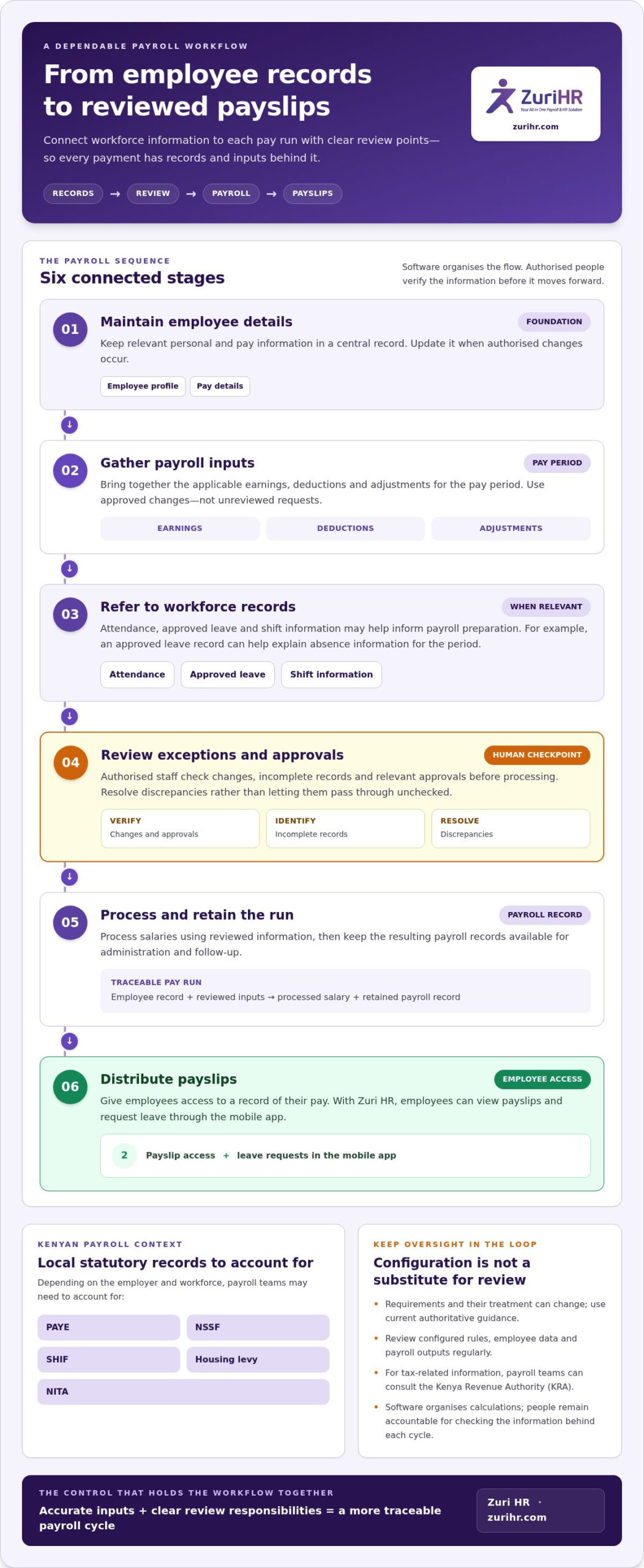
A payroll cycle moves through connected stages: employee details and work information inform earnings, deductions and adjustments; the team then reviews the results and prepares payslips and records. In Kenya, SHIF, NSSF and PAYE are examples of payroll deductions a business may need to account for. They illustrate the range of inputs involved, not legal guidance on rates or calculation rules.
Where manual payroll creates repeated handling
In a spreadsheet-based process, staff may collect employee changes, attendance figures and leave information from different records before entering them into a payroll workbook. They update earnings and deductions, apply formulas, reconcile totals against source records, review the results and save payroll files and payslips. Each transfer is a control point: the team needs to ensure the figures in the calculation match the latest source information.
If someone corrects an attendance record or updates a leave entry after payroll data has been copied, staff may need to revise the workbook and recheck related totals. Clear file ownership, version control and a review step help teams manage those edits. Manual handling doesn’t automatically mean mistakes or non-compliance, but separate records can make it harder to see whether every update has carried through.
How connected payroll software organises the workflow
Configured payroll software structures the calculation around entered employee data and defined earnings, deductions and benefits. Payroll teams can use configured rules to support repeatable gross-to-net calculations and proration, then review the resulting figures before finalising records. For a Kenyan payroll, SHIF, NSSF and PAYE are examples of deduction categories managed within the calculation workflow, not a guide to current statutory requirements.
With connected modules, Leave Management and Time & Attendance can feed relevant workforce records into Payroll Management. Connected attendance and leave records give payroll teams a shared source of workforce inputs for preparing earnings and adjustments. This reduces the need to re-enter the same information across separate records, while keeping review of the inputs and payroll output in the team’s hands.
For example, an approved leave change or recorded attendance information can inform payroll preparation before the team reviews calculations. Payroll Management can then produce documented digital outputs, including PDF payslips and statutory exports. These records give the business consistent outputs to access and retain within its payroll workflow.
The essential distinction in payroll software vs manual payroll is how information travels from source records into calculations and documented outputs. Software can connect and structure that flow, but it still depends on accurate inputs and deliberate review. Businesses planning a transition can use this payroll automation guide to consider implementation steps. Zuri HR’s connected payroll and workforce management platform brings leave, attendance and payroll workflows together.
Manual payroll vs software: Compare control, effort, and scalability
There’s no universal winner in the payroll software vs manual payroll decision. Compare how each approach handles the work your team actually performs: setting up the process, updating inputs, reviewing calculations and keeping records accessible. A spreadsheet can remain workable for a predictable workflow. Software becomes more relevant as recurring changes and handoffs increase, but it also requires setup and ongoing system oversight.
| Decision factor | Manual payroll | Payroll software |
|---|---|---|
| Setup | Staff create and maintain calculation files, formulas and record structures. | The business configures payroll rules and establishes how staff enter workforce data. |
| Recurring administration | Staff update figures, perform calculations and maintain records each cycle. | Configured calculations support repeatable processing, while staff prepare inputs and review results. |
| Data flow | Information may move manually between attendance, leave and payroll records. | Connected workforce modules can provide relevant inputs to payroll. |
| Review | Teams check formulas, source figures and changes across files. | Teams review entered data and generated calculations within the configured workflow. |
| Records | Access depends on file storage, naming and sharing practices. | Digital outputs, such as payslips, organise payroll records in system-supported formats. |
| Scalability | Expansion can mean more files, updates and coordination for staff to manage. | Configured processes can support a more structured workflow as inputs and requirements grow. |
When can manual payroll remain workable?
Manual payroll may suit a stable process with few recurring changes, clear ownership and a consistent review routine. Assign responsibility for source records, protect current files from uncontrolled edits, and document how staff check formulas and totals. These practices help preserve visibility. Manual processing remains useful while the team can maintain those controls without creating an unmanageable chain of updates.
When does payroll software offer stronger operational control?
Software becomes more relevant when attendance, leave, pay inputs or statutory outputs change frequently and staff need to coordinate updates. Configured calculations and digital payslips can structure recurring work, but they don’t eliminate the need for accurate inputs. The business must also set appropriate access, define who reviews results and maintain oversight of the workflow.
Assess cost practically rather than assuming a return on investment. Compare the effort involved in maintaining spreadsheets, checking repeated calculations and managing records with the work of configuring and overseeing software. Include the time your team spends on handoffs and corrections, without treating either approach as cost-free. If connected payroll workflows fit your operating needs, explore Zuri HR payroll management as an option for structuring that work.
A practical framework for choosing between manual payroll and software
Make the decision using evidence from your current workflow, not assumptions about business size. The payroll software vs manual payroll review below helps your team identify where work repeats, where information changes and which controls your process needs. Use a recent payroll cycle as a reference, then check whether the same patterns occur across other cycles.
- Map the inputs. List the employee details, earnings, deductions, attendance data and leave changes used to prepare payroll. Note where each item originates and who supplies it.
- Measure the handoffs. Trace each transfer between records, spreadsheets, approvers and payslip distribution. Mark where staff re-enter information or reconcile differences.
- Assess change frequency. Review how often pay components, employee records, attendance inputs and leave details change. Consider whether recurring calculations stay stable or need regular adjustment.
- Identify the controls. Document who checks calculations, approves changes, maintains source records and handles employee record requests. Include the reports and records the team must retain.
- Choose the workflow. Keep manual processing if the steps remain clear and manageable. Consider software if repeated handoffs and changing inputs make a configured, connected workflow more useful.
Which payroll signals matter most to your decision?
Check whether inputs arrive in consistent formats and at predictable points in the cycle. List transfers between attendance records, leave information, payroll calculations and payslip distribution. Each handoff adds coordination work, even if the team manages it reliably. Also document structural requirements, such as separate company or branch records and role-based access needs. Treat these as requirements to define, not assumed software capabilities.
Compare staff effort and review effort together. A process may involve few calculations but still require substantial follow-up to collect missing inputs or verify changes. Employee requests for payslips or record updates also matter: note how the team receives, fulfils and records them today. This will show whether the main pressure comes from calculation, coordination, review or access.
How can a business prepare to move from manual payroll?
Before selecting software, organise employee records, payroll components and current calculation procedures. Record the fields used, the approval path, the reports produced and how employees receive payroll communications. This inventory clarifies what the future workflow must preserve and where the team can standardise its process.
Plan the change in phases as a general project approach. The team can first organise records and define review responsibilities, then configure the intended workflow and prepare staff for changed steps. Decide how reviewers will compare outputs with source information and how employees will learn about process updates. A deliberate transition supports continuity, while the organisation remains responsible for accurate records and human oversight.
Once you’ve mapped the inputs and controls, explore Zuri HR payroll management to see how a connected payroll workflow may fit your organisation’s requirements.
How Zuri HR connects payroll with workforce operations
Zuri HR is an integrated workforce management platform that connects Payroll Management with workforce records. It supports payroll workflows through configured calculations and digital outputs. Your team remains responsible for payroll inputs, review and decisions. For organisations comparing payroll software vs manual payroll, the distinction is how the platform brings recurring payroll tasks and related records into a connected system.
What Zuri HR Payroll Management includes
The Payroll Management module supports configured earnings, deductions and benefits, alongside gross-to-net calculations and proration. It includes SHIF, NSSF and PAYE automation. These capabilities help structure payroll calculations using the information entered by the business, while the team reviews the data and results. The module also supports salary advances, expense claims and P9 forms.
For payroll records, the module provides PDF payslips and statutory exports. These digital outputs don’t replace the business’s review of the information and calculations behind them. Keeping calculation support and payroll records within the workforce management platform gives teams a defined place to manage these payroll tasks and outputs.
How connected modules support a unified workflow
Payroll preparation often relies on information managed outside the calculation itself. Zuri HR’s Time & Attendance and Leave Management workflows connect with Payroll Management, allowing attendance and leave data to flow into payroll. Leave information can flow through attendance records before reaching payroll, helping the team use related workforce information during preparation. Staff still need to review the records and confirm that the inputs reflect the intended pay period.
This connection matters because payroll inputs are not limited to fixed employee details. Attendance records and leave information can affect the data a team uses to prepare calculations. Rather than re-entering every related detail in separate records, connected modules provide a structured data flow from workforce activity to payroll. The team retains oversight of what it enters, checks and processes.
Employees also have mobile access to payslips through the platform. This gives the business a digital way to provide access to payroll records, alongside the PDF payslips available from Payroll Management. The mobile app is an employee access channel, while the payroll module supports calculations and payroll outputs. Each capability serves a distinct part of the workflow.
The result is a connected workforce management approach that keeps your team involved. Your team configures the relevant payroll components, maintains workforce records and reviews the resulting calculations and documents. To explore how this structure could fit your payroll workflow, explore Zuri HR payroll management.
Set your payroll workflow up for what comes next
The best choice is the one your team can govern consistently as operations change. Treat the decision as part of your operating model: assign clear ownership for payroll inputs, reviews and employee records, then revisit those responsibilities as workflows evolve. This keeps the choice between payroll software vs manual payroll anchored to how your business works, not to assumptions about what every organisation needs.
Zuri HR’s integrated platform connects workforce operations with Payroll Management. Its capabilities include SHIF, NSSF and PAYE automation, attendance and leave data flows into payroll, PDF payslips, statutory exports and employee mobile access to payslips. Your team still provides accurate inputs and reviews payroll outputs, with the platform supporting a structured workflow.
Move forward with a clear view of the process you want to manage. Explore Zuri HR Payroll Management and consider how a connected workflow could support your team’s next stage of growth.
Frequently Asked Questions
Is payroll software better than manual payroll for a small business?
It depends on how your payroll operates, not just how many people you employ. If pay details rarely change and one person can maintain clear checks, a manual process may be workable. If a change to leave, attendance or pay details triggers updates in several places, software may provide a more structured workflow. Compare the recurring work and review points in your payroll software vs manual payroll assessment before deciding.
Can a business run payroll manually in Kenya?
A business can use a manual payroll process, but it remains responsible for maintaining records, performing calculations, reviewing results and preparing payroll outputs. For example, your team may need to trace how employee records and deduction information feed into its calculations. SHIF, NSSF and PAYE are Kenyan payroll examples, not a substitute for current guidance. Verify applicable requirements through authoritative sources before making payroll decisions.
How much time does payroll software save compared with manual payroll?
There isn’t a reliable fixed saving to apply to every business. The difference depends on your inputs, handoffs and existing process. Track the work involved in gathering attendance and leave details, entering payroll information, checking calculations, resolving discrepancies and preparing payslips. Then compare those tasks with the software capabilities you would use. This gives your team a grounded view of potential workflow changes without relying on generic time-saving claims.
What happens if a payroll software calculation is wrong?
Pause processing and trace the result back to its source. Check the employee record, the entered payroll components and the configured calculation, then follow your approval process for corrections. Keep a record of what changed and who reviewed it so the team can understand the adjustment later. Repeatable calculations can support a consistent process, but they don’t verify that every input is accurate or that a result is appropriate. For practical steps to reduce payroll errors in Kenya, review the inputs and controls at each stage of the pay run.
Does payroll software automatically handle SHIF, NSSF and PAYE?
Features differ between systems. Zuri HR Payroll Management includes SHIF, NSSF and PAYE automation, as well as statutory exports. Automation supports payroll calculations and outputs, but it isn’t legal advice and doesn’t remove the need for accurate employee information. Before processing payroll, verify current statutory requirements and applicable calculations through authoritative sources, then review the system’s outputs as part of your organisation’s normal approval process.
Can payroll software connect attendance and leave records to payroll?
Some integrated platforms support this type of data flow. Zuri HR connects Time & Attendance with Payroll Management, and leave information can flow through attendance into payroll. For example, a team can use the connected workflow to bring relevant attendance and leave records into payroll preparation rather than relying solely on separate files. Staff should still check that source records reflect the correct period and review payroll outputs.
Is switching from manual payroll to software difficult?
The transition depends on how well the organisation understands its current records and review process. Start by checking employee data, payroll components, calculation procedures and approval responsibilities for gaps or inconsistencies. Then plan how the team will compare payroll outputs and explain changed steps to employees. A phased approach can help organise this work, but each organisation should set a sequence that fits its records, responsibilities and operational needs.